Site-to-site VPN
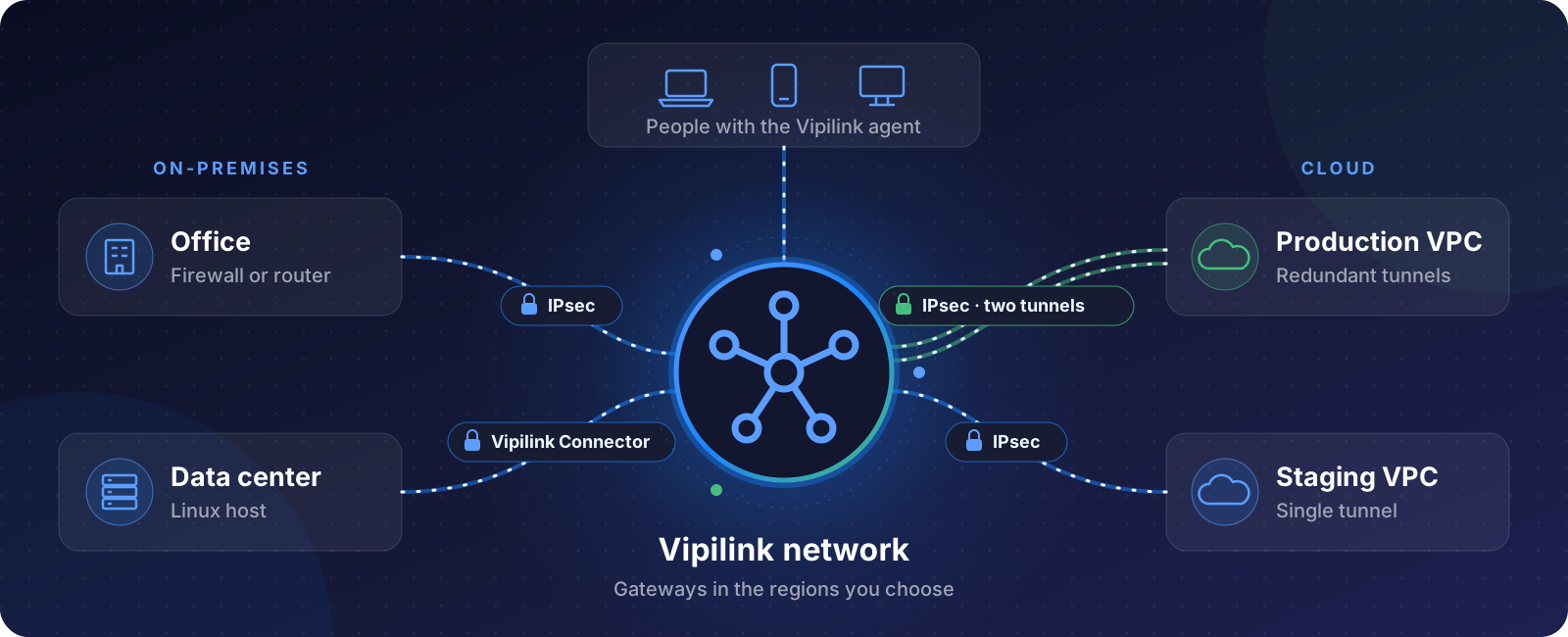
Connect your offices, data centers and cloud networks to a Vipilink network. People who are connected with the Vipilink agent can then reach private servers and apps in those places, and you control who reaches what with firewall rules.
How it works
- Your Vipilink network has gateways in the regions you choose.
- You add a tunnel from a Vipilink gateway to your site or cloud.
- You add routes on both sides. In Vipilink, the network's Route Table lists the subnets behind each tunnel. On your side, you route the Vipilink network subnet back through the tunnel.
- People connect with the agent and reach the subnets behind the tunnel. Firewall rules decide which traffic is allowed.
Tunnel types
When you add a tunnel to a gateway, you choose one of three types.
-
IPsec site-to-site tunnel
The standard choice. Works with cloud VPN gateways and with most firewalls and routers. Available as a single tunnel or as redundant tunnels.
-
Vipilink Connector
A WireGuard-based connector that you install on a Linux host in your network (Ubuntu 18.04 or later, or CentOS 7). Use it when you don't have a device that supports IPsec.
-
WireGuard Peer
Connects your Vipilink gateway to a WireGuard node that you already run.
Single or redundant tunnels
IPsec tunnels come in two forms. Pick redundant tunnels when the connection must stay up even if one gateway or tunnel fails.
| Single tunnel | Redundant tunnels | |
|---|---|---|
| Vipilink gateways needed | 1 | 2, in the same or different regions |
| Routing | Static routes | BGP for failover, plus static routes |
| If a tunnel goes down | Traffic stops until the tunnel is back | Traffic moves to the other tunnel |
| Where to choose it | Single-Tunnel | Dual-Tunnel |
Setup guides
Cloud
-
Single tunnel
One Vipilink gateway, static routing.
-
Redundant tunnels
Two Vipilink gateways, automatic failover with BGP.
On-premises firewalls and routers
Don't see your device? Most firewalls and routers that support IPsec (IKEv1 or IKEv2) with a pre-shared key can connect. Use the settings from one of these guides, or contact support.
Before you start
- The Vipilink network subnet and the subnets behind the tunnel must not overlap.
- Your firewall or cloud must allow IPsec traffic from the Vipilink gateway's public IP.
- Allow traffic from the Vipilink network subnet in your own firewall rules or cloud security groups, so connected users can reach your servers.